analytics · alternative · tutorial
Free Datafast Alternative in Next.js: Cookieless Analytics
A free Datafast alternative inside your Next.js app: visits and sales in one database, a cookieless setting, and no second bill. Honest limits included.
Indie hackers love Datafast and Plausible because Google Analytics is bloated and slow.
But once your SaaS gains traction, you pay a monthly fee just to see which referral links sent visitors to your landing page.
Third-party analytics scripts can also bring consent-banner questions with them. And your visitor data lives in one tool while your sales live in another.
What you need
Daily visitors.
Top referrers.
Campaign breakdowns.
Conversion funnels.
A live view of who is on the site right now.
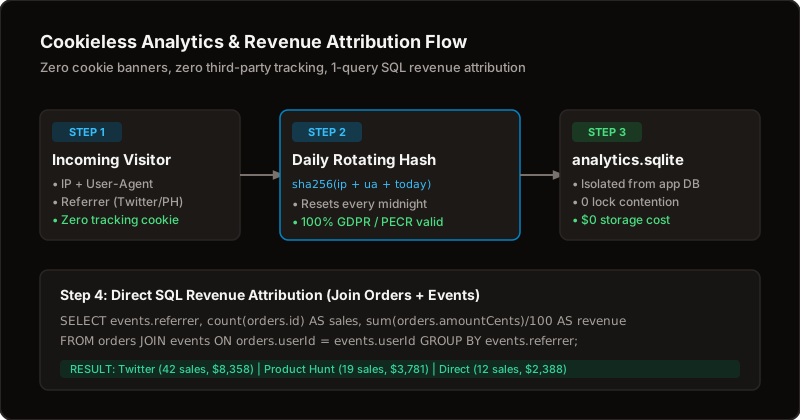
And one more thing the paid tools make hard. Which post, tweet or link led to this $199 sale?
The answer is simple when visits and orders sit in the same database.
No export. No spreadsheet. No automation tool between two dashboards.
The fatal flaw of separate tools
Your orders live in your payment provider. Your pageviews live in a dashboard somewhere else.
Connecting them takes spreadsheets, automation tools or an expensive add-on.
When both live in the same database, revenue by source is one question instead of a project.
Busy pageview writes should also stay away from payment work. Give analytics a file of its own, so a traffic spike never slows a checkout.
Be honest about cookies
Analytics are not cookie-free by default.
In the default mode, one first-party session cookie groups a visit's pageviews, and the session ends after a short idle time. Your own site sets it. No third-party tracker.
Cookieless is a setting. Turn it on and the cookie stops. Every hit then counts as its own visit.
It also switches itself on for visitors whose browser sends a Global Privacy Control or Do Not Track signal.
Stored IP addresses are shortened before they are saved. The full address is not kept.
Whether any of this lets you skip a consent banner depends on your country and your lawyer. Not on a blog post.
What to do
Record pageviews and sign-ups in your own database.
Show them in a dashboard inside your app. Read them from a terminal too: bp analytics overview, bp analytics funnel, bp analytics revenue, bp analytics live.
That means your coding agent can read them.
Check the live view while you browse your own site. If your own visit shows up, the whole chain works.
What you give up
Be honest about the gap.
The numbers cover the questions a solo product asks every day.
Where did they come from?
Did they sign up?
Did they buy?
It is not a full product-analytics suite.
No session replay.
No heatmaps.
No experiment framework.
A quick way to decide
| If you need | Pick |
|---|---|
| Sales tied to the page that led to them | Built-in analytics |
| Zero extra monthly fee | Built-in analytics |
| Replays, heatmaps, experiments | A specialist tool |
| The strictest privacy posture | Built-in, with the cookieless setting on |
Setting it up
There is little to set up.
Analytics are on by default. One switch turns them off. A second setting makes them cookieless.
The dashboard needs no extra account. The terminal commands use the same sign-in as the rest of the bp tools.
Visit your site in a private window. Click around. Watch the live view.
Then place a test order and check that it appears next to the visit that led to it.
Know this first
BoringPush analytics are not cookie-free by default. They set one first-party session cookie. Cookieless is a setting.
There is no session replay, no heatmap and no experiments.
Why BoringPush is the way to do this
See where sales come from.
Visits and orders live in the same database. Which link led to which sale is one question, not a project.
A dashboard inside your app.
Commands for your terminal.
No second bill.
No tracker script.
FAQ
Is BoringPush analytics cookie-free?
Not by default. The default mode sets one first-party session cookie. A single setting turns that off, and it also turns off automatically for visitors whose browser sends a Global Privacy Control or Do Not Track signal.
Does it need a cookie banner?
That depends on where your visitors live and what you track. In the strictest setting, the kit sets no analytics cookie, which is the safest starting point. This post is not legal advice, so check your local rules.
Can I see which source made a sale?
Yes. Because visits and orders sit in the same database, revenue can be broken down by referrer or campaign, and bp analytics revenue prints it.
Does it slow my payments?
High-volume pageview writes are kept separate from payment records, so busy traffic does not compete with a checkout.
Do I need an extra script or package?
No. There is no third-party tracker script and no extra package to install.
What do I lose compared with Datafast or Plausible?
Polish and breadth. Those tools are focused products with years of refinement. BoringPush gives you the essentials inside your own app for no monthly fee.
Keep reading
- Free Mixpanel and Google Analytics Alternative — the same dashboard, framed against the big two
- Free Firebase and Supabase Alternative — the database your analytics live in
- Stripe vs LemonSqueezy vs Dodo for Next.js — the checkout that your attribution ties to
+ all the boring stuff (analytics, auth, SQLite ↔ Supabase, full marketplace, webhooks)
Command from your phone.
Built so autonomous AI agents build what you want without breaking what's already paying you.
- Built-in analytics — cookie-free mode, $0 forever, no PostHog bill
- SQLite ↔ Supabase: one setting, same field names
- Full digital marketplace & feedback boards included
- 3 payment rails: Stripe, LemonSqueezy & Dodo Payments
- Agent fences: lint gate, read-only data access, auto-rollback
- Ship from your phone via SSH & WireGuard/Tailscale in under a minute
$199
Get BoringPushOne-time payment · Lifetime updates · Unlimited projects.
Keep reading