storage · alternative · tutorial
Free Uploadcare Alternative: Direct Uploads to R2
A free Uploadcare and Cloudinary alternative: direct browser-to-bucket uploads on Cloudflare R2 or S3, with no server memory spikes and no extra monthly fee.
Handling user file uploads in Next.js usually corners developers into two costly options.
- Proxying files through your Next.js server. Streaming big files through your own endpoints can exhaust memory on a small VPS or a serverless function. Timeouts. Out-of-memory crashes.
- Paying for Uploadcare or Cloudinary. Hosted file services remove the infrastructure headache, but bill a monthly fee with bandwidth and storage limits. Check their current plans, because they change.
There is a third way. Direct browser-to-bucket uploads on Cloudflare R2 or Amazon S3, with your server never holding the file.
How it works
The browser uploads directly to object storage, using a short-lived signed address.
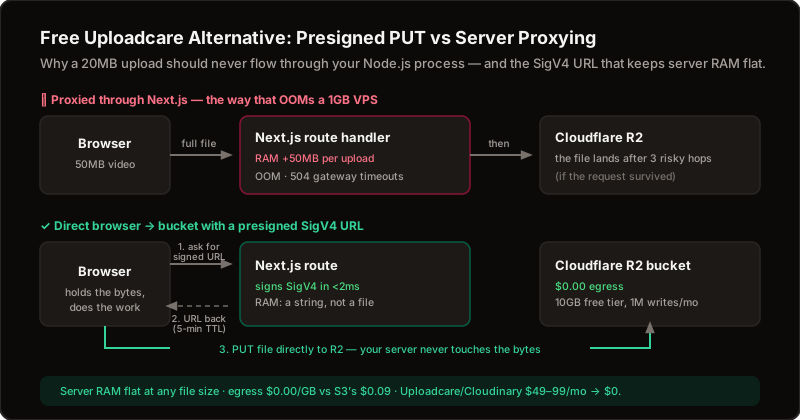
Your server only signs and checks.
The file streams from the browser to storage, so your server's memory stays flat.
A 10KB avatar or a large video.
Same.
What you need
- An upload component. Drag-and-drop zones, progress indicators, folders and file-type limits.
- No storage SDK. Requests are signed with built-in tooling, so there is no heavy cloud library in your app.
- R2 or S3. Pick your provider with one setting. R2 does not charge for download traffic, while S3 does. Check each provider's current pricing and free tier.
- Safe defaults. The server decides the file's name and location, so a client cannot pick a path. Each person can only touch files under their own folder.
Why it is safer than it looks
Permission is checked where the signed address is minted. The server verifies who is asking, whether the file type is allowed and how large it may be.
Your own server generates the file's name and ignores the original filename. That closes off path traversal tricks.
After the upload, a finalize step confirms the file really exists with the expected size and type before anything is recorded.
Downloads and deletes check that the file belongs to the person asking.
Setting it up
Create a bucket in your Cloudflare or AWS dashboard. Note the account details, the access keys and the bucket name.
Add them to your production settings and sync with bp secret sync. Then add the bucket's public address, or a custom domain in front of it, so files can be served.
Upload one test file from your own site. Open it in a fresh browser tab.
If it loads from your domain, the whole chain works. Then try a file type that is not on the allowed list. It should be rejected before any upload begins.
Choosing between R2 and S3
Pick R2 if your files are downloaded often, because download traffic is where object storage bills grow.
Pick S3 if the rest of your stack already lives on AWS and you want one invoice.
Either way, keep your own domain in front of the bucket. The addresses saved in your database are then yours, and you can move vendors later with a copy and a DNS change.
Hosted service or built-in
| Question | BoringPush built-in | A hosted upload service |
|---|---|---|
| Monthly fee | None extra | A plan |
| Where files live | Your own bucket | The vendor's storage |
| Server memory used | None | None |
| Image transforms and CDN tricks | Not included | Built in |
| Setup | A bucket and a few settings | An account and an SDK |
What you give up
The hosted services are polished products.
They include image transformations, resizing on the fly, video processing and a global delivery network. BoringPush's uploads are the plain, reliable core: signed uploads, safety checks and a component to use them.
If you need transforms later, add them in front of your bucket. Your files stay where they are.
Know this first
Uploadcare and Cloudinary include image transforms and global delivery. BoringPush does not.
There is no chunked upload and no virus scan.
Why BoringPush is the way to do this
Uploads, in the box.
A drag-and-drop component, signed uploads and safe file names. Pick R2 or S3 with one setting.
No monthly fee for the feature.
FAQ
Is the built-in upload really free?
It ships with the kit, so there is no monthly fee for the feature. You pay your storage provider for what you store, and R2 charges nothing for download traffic.
Does it work with S3 as well as R2?
Yes. You choose the provider with a setting, and the signing works for both.
Can users overwrite each other's files?
No. File names and locations are generated by the server and namespaced by user, and every download, delete and finalize checks that the file belongs to the person asking.
What file types and sizes are allowed?
The kit has a list of allowed types, folders and size limits that you can change in its storage settings. Anything outside the list is rejected before an upload address is created.
Do I need to install AWS libraries?
No. The kit signs requests itself, so there is no AWS SDK dependency.
Keep reading
- Direct Uploads to R2 or S3: Zero Server RAM — the same pattern in more depth
- Free Firebase and Supabase Alternative — the database your file records live in
- Cloudflare Tunnel + Next.js: Hackers Find Zero Open Ports — the safe road to your server
+ all the boring stuff (analytics, auth, SQLite ↔ Supabase, full marketplace, webhooks)
Command from your phone.
Built so autonomous AI agents build what you want without breaking what's already paying you.
- Built-in analytics — cookie-free mode, $0 forever, no PostHog bill
- SQLite ↔ Supabase: one setting, same field names
- Full digital marketplace & feedback boards included
- 3 payment rails: Stripe, LemonSqueezy & Dodo Payments
- Agent fences: lint gate, read-only data access, auto-rollback
- Ship from your phone via SSH & WireGuard/Tailscale in under a minute
$199
Get BoringPushOne-time payment · Lifetime updates · Unlimited projects.
Keep reading